
Efficient Gaussian blur with linear sampling
Gaussian blur
Gaussian blur is an image space effect that is used to create a softly blurred version of the original image. This image then can be used by more sophisticated algorithms to produce effects like bloom, depth-of-field, heat haze or fuzzy glass. In this article I will present how to take advantage of the various properties of the Gaussian filter to create an efficient implementation as well as a technique that can greatly improve the performance of a naive Gaussian blur filter implementation by taking advantage of bilinear texture filtering to reduce the number of necessary texture lookups. While the article focuses on the Gaussian blur filter, most of the principles presented are valid for most convolution filters used in real-time graphics.
Gaussian blur is a widely used technique in the domain of computer graphics and many rendering techniques rely on it in order to produce convincing photorealistic effects, no matter if we talk about an offline renderer or a game engine. Since the advent of configurable fragment processing through texture combiners and then using fragment shaders the use of Gaussian blur or some other blur filter is almost a must for every rendering engine. While the basic convolution filter algorithm is a rather expensive one, there are a lot of neat techniques that can drastically reduce the computational cost of it, making it available for real-time rendering even on pretty outdated hardware. This article will be most like a tutorial article that tries to present most of the available optimization techniques. Some of them may be familiar to all of you but maybe the linear sampling will bring you some surprise, but let’s not go that far but start with the basics.
Terminology
In order to precede any possibility of confusion, I’ll start the article with the introduction of some terms and concepts that I will use in the post.
Convolution filter – An algorithm that combines the color value of a group of pixels.
NxN-tap filter – A filter that uses a square shaped footprint of pixels with the square’s side length being N pixels.
N-tap filter – A filter that uses an N-pixel footprint. Note that an N-tap filter does *not* necessarily mean that the filter has to sample N texels as we will see that an N-tap filter can be implemented using less than N texel fetches.
Filter kernel – A collection of relative coordinates and weights that are used to combine the pixel footprint of the filter.
Discrete sampling – Texture sampling method when we fetch the data of exactly one texel (aka GL_NEAREST filtering).
Linear sampling – Texture sampling method when we fetch a footprint of 2×2 texels and we apply a bilinear filter to aquire the final color information (aka GL_LINEAR filtering).
Gaussian filter
The image space Gaussian filter is an NxN-tap convolution filter that weights the pixels inside of its footprint based on the Gaussian function:
![]()
The pixels of the filter footprint are weighted using the values got from the Gaussian function thus providing a blur effect. The spacial representation of the Gaussian filter, sometimes referred to as the “bell surface”, demonstrates how much the individual pixels of the footprint contribute to the final pixel color.

The graphical representation of the 2-dimensional Gaussian function
Based on this some of you may already say “aha, so we simply need to do NxN texture fetches and weight them together and voilà”. While this is true, it is not that efficient as it looks like. In case of a 1024×1024 image, using a fragment shader that implements a 33×33-tap Gaussian filter based on this approach would need an enormous number of 1024*1024*33*33 ≈ 1.14 billion texture fetches in order to apply the blur filter for the whole image.
In order to get to a more efficient algorithm we have to analyze a bit some of the nice properties of the Gaussian function:
- The 2-dimensional Gaussian function can be calculated by multiplying two 1-dimensional Gaussian function:
![]()
- A Gaussian function with a distribution of 2σ is equivalent with the product of two Gaussian functions with a distribution of σ.
Both of these properties of the Gaussian function give us room for heavy optimization.
Based on the first property, we can separate our 2-dimensional Gaussian function into two 1-dimensional one. In case of the fragment shader implementation this means that we can separate our Gaussian filter into a horizontal blur filter and the vertical blur filter, still getting the accurate results after the rendering. This results in two N-tap filters and an additional rendering pass needed for the second filter. Getting back to our example, applying the two filters to a 1024×1024 image using two 33-tap Gaussian filters will get us to 1024*1024*33*2 ≈ 69 million texture fetches. That is already more than an order of magnitude less than the original approach made possible.
Using the second property of the Gaussian function, we can separate our 33×33-tap filter into three 9×9-tap filter (9+8=17, 17+16=33). Back to our example, for the 1024×1024 sized image this results in 1024*1024*9*9*3 ≈ 255 million texture fetches. As we can see, we also spared a large amount of the necessary texture fetches using this approach as well.
Of course, the combination of the two techniques is also possible. That means we both separate our filter to a vertical and horizontal filter as well as decompose our 33-tap filter into three 9-tap filter. This will get us to the almost optimal number of 1024*1024*9*3*2 ≈ 56 million texture fetches.
Gaussian kernel weights
We’ve seen how to implement an efficient Gaussian blur filter for our application, at least in theory, but we haven’t talked about how we should calculate the weights for each pixel we combine using the filter in order to get the proper results. The most straightforward way to determine the kernel weights is by simply calculating the value of the Gaussian function for various distribution and coordinate values. While this is the most generic solution, there is a simpler way to get some weights by using the binomial coefficients. Why we can do that? Because the Gaussian function is actually the distribution function of the normal distribution and the normal distribution’s discrete equivalent is the binomial distribution which uses the binomial coefficients for weighting its samples.
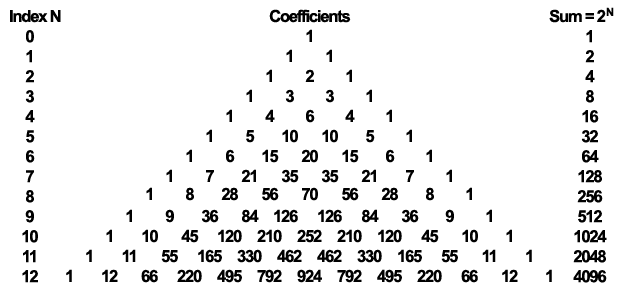
The Pascal triangle showcasing the binomial coefficients that can be used to calculate the kernel weights (each element in the succeeding rows is the sum of its "parents").
For implementing our 9-tap horizontal and vertical Gaussian filter we will use the last row of the Pascal triangle illustrated above in order to calculate our weights. One may ask why we don’t use the row with index 8 as it has 9 coefficients. This is a justifiable question, but it is rather easy to answer it. This is because with a typical 32 bit color buffer the outermost coefficients don’t have any effect on the final image while the second outermost ones have little to no effect. We would like to minimize the number of texture fetches but provide the highest quality blur as possible with our 9-tap filter. Obviously, in case very high precision results are a must and a higher precision color buffer is available, preferably a floating point one, using the row with index 8 is better. But let’s stick to our original idea and use the last row…
By having the necessary coefficients, it is very easy to calculate the weights that will be used to linearly interpolate our pixels. We just have to divide the coefficient by the sum of the coefficients that is 4096 in this case. Of course, for correcting the elimination of the four outermost coefficients, we shall reduce the sum to 4070, otherwise if we apply the filter several times the image may get darker.
Now, as we have our weights it is very straightforward to implement our fragment shaders. Let’s see how the vertical file shader will look like in GLSL:
uniform sampler2D image;
out vec4 FragmentColor;
uniform float offset[5] = float[]( 0.0, 1.0, 2.0, 3.0, 4.0 );
uniform float weight[5] = float[]( 0.2270270270, 0.1945945946, 0.1216216216,
0.0540540541, 0.0162162162 );
void main(void)
{
FragmentColor = texture2D( image, vec2(gl_FragCoord)/1024.0 ) * weight[0];
for (int i=1; i<5; i++) {
FragmentColor +=
texture2D( image, ( vec2(gl_FragCoord)+vec2(0.0, offset[i]) )/1024.0 )
* weight[i];
FragmentColor +=
texture2D( image, ( vec2(gl_FragCoord)-vec2(0.0, offset[i]) )/1024.0 )
* weight[i];
}
}
Obviously the horizontal filter is no different just the offset value is applied to the X component rather than to the Y component of the fragment coordinate. Note that we hardcoded here the size of the image as we divide the resulting window space coordinate by 1024. In a real life scenario one may replace that with a uniform or simply use texture rectangles that don’t use normalized texture coordinates.
If you have to apply the filter several times in order to get a more strong blur effect, the only thing you have to do is ping-pong between two framebuffers and apply the shaders to the result of the previous step.
9-tap Gaussian blur filter applied to an image of size 1024x1024: no filter applied (left), applied once (middle), applied nine times (right). Click to view the full-sized image in order to better see the difference.
Linear sampling
So far, we were able to see how to implement a separable Gaussian filter using two rendering pass in order to get a 9-tap Gaussian blur. We’ve also seen that we can run this filter three times over a 1024×1024 sized image in order to get a 33-tap Gaussian blur by using only 56 million texture fetches. While this is already quite efficient it does not really expose any possibilities of the GPUs as this form of the algorithm would work perfectly almost unmodified on a CPU as well.
Now, we will see that we can take advantage of the fixed function hardware available on the GPU that can even further reduce the number of required texture fetches. In order to get to this optimization let’s discuss one of the assumptions that we made from the beginning of the article:
So far, we assumed that in order to get information about a single pixel we have to make a texture fetch, that means for 9 pixels we need 9 texture fetches. While this is true in case of a CPU implementation, it is not necessarily true in case of a GPU implementation. This is because in the GPU case we have bilinear texture filtering at our disposal that comes with practically no cost. That means if we don’t fetch at texel center positions our texture then we can get information about multiple pixels. As we already use the separability property of the Gaussian function we actually working in 1D so for us bilinear filter will provide information about two pixels. The amount of how much each texel contribute to the final color value is based on the coordinate that we use.
By properly adjusting the texture coordinate offsets we can get the accurate information of two texels or pixels using a single texture fetch. That means for implementing a 9-tap horizontal/vertical Gaussian filter we need only 5 texture fetches. In general, for an N-tap filter we need [N/2] texture fetches.
What this will mean for our weight values previously used for the discrete sampled Gaussian filter? It means that each case we use a single texture fetch to get information about two texels we have to weight the color value retrieved by the sum of the weights corresponding to the two texels. Now that we know what are our weights, we just have to calculate the texture coordinate offsets properly.
For texture coordinates, we can simply use the middle coordinate between the two texel centers. While this is a good approximation, we won’t accept it as we can calculate much better coordinates that will result us exactly the same values as when we used discrete sampling.
In case of such a merge of two texels we have to adjust the coordinates that the distance of the determined coordinate from the texel #1 center should be equal to the weight of texel #2 divided by the sum of the two weights. In the same style, the distance of the determined coordinate from the texel #2 center should be equal to the weight of texel #1 divided by the sum of the two weights.
As a result, we get the following formulas to determine the weights and offsets for our linear sampled Gaussian blur filter:

By using this information we just have to replace our uniform constants and decrease the number of iterations in our vertical filter shader and we get the following:
uniform sampler2D image;
out vec4 FragmentColor;
uniform float offset[3] = float[]( 0.0, 1.3846153846, 3.2307692308 );
uniform float weight[3] = float[]( 0.2270270270, 0.3162162162, 0.0702702703 );
void main(void)
{
FragmentColor = texture2D( image, vec2(gl_FragCoord)/1024.0 ) * weight[0];
for (int i=1; i<3; i++) {
FragmentColor +=
texture2D( image, ( vec2(gl_FragCoord)+vec2(0.0, offset[i]) )/1024.0 )
* weight[i];
FragmentColor +=
texture2D( image, ( vec2(gl_FragCoord)-vec2(0.0, offset[i]) )/1024.0 )
* weight[i];
}
}
This simplification of the algorithm is mathematically correct and if we don’t consider possible rounding errors resulting from the hardware implementation of the bilinear filter we should get the exact same result with our linear sampling shader like in case of the discrete sampling one.
9-tap Gaussian blur applied nine times with discrete sampling (left) and linear sampling (right). Click for the full resolution of the image. Note that there is no visible difference between the two techniques even after several passes.
While the implementation of the linear sampling is pretty straightforward, it has a quite visible effect on the performance of the Gaussian blur filter. Taking into consideration that we managed to implement a 9-tap filter using just five texture fetches instead of nine, back to our example, blurring a 1024×1024 image with a 33-tap filter takes only 1024*1024*5*3*2 ≈ 31 million texture fetches instead of the 56 million required by discrete sampling. This is a quite reasonable difference and in order to better present how much that matters I’ve done some experiment to measure the difference between the two techniques. The result speaks for itself:

Performance comparison of the 9-tap Gaussian blur filter with discrete and linear sampling on a Radeon HD5770. The vertical axis is the frames per second (higher is better) and the horizontal axis represents results with various number of blur steps (higher is blurrier).
As we can see, the performance of the Gaussian filter implemented with linear sampling is about 60% faster than the one implemented with discrete sampling indifferent from the number of blur steps applied to the image. This roughly proportional to the number of texture fetches spared by using linear filtering.
Conclusion
We’ve seen that implementing an efficient Gaussian blur filter is quite straightforward and the result is a very fast real-time algorithm, especially using the linear sampling, that can be used as the basis of more advanced rendering techniques.
Even though we concentrated on Gaussian blur in this article, many of the discussed principles apply to most convolution filter types. Also, most of the theory applies in case we need a blurred image of reduced size like it is usually needed by the bloom effect, even the linear sampling. The only thing that is really different in case of a reduced size blurred image is that our center pixel is also a “double-pixel”. This means that we have to use a row from our Pascal triangle that has even number of coefficients as we would like to linear sample the middle texels as well.
We’ve also had a brief insight into the computational complexity of the various techniques and how the filter can be efficiently implemented on the GPU.
The demo application used for the measurements performed to compare the discrete and linear sampling method can be downloaded here:
Binary release
Platform: Windows
Dependency: OpenGL 3.3 capable graphics driver
Download link: gaussian_win32.zip (2.96MB)
Language: C++
Platform: cross-platform
Dependency: GLEW, SFML, GLM
Download link: gaussian_src.zip (5.37KB)
P.S.: Sorry for the high minimum requirements of the application just I would really like to stick to strict OpenGL 3+ demos.
| Print article | This entry was posted by Daniel Rákos on September 7, 2010 at 8:48 pm, and is filed under Graphics, Programming, Samples. Follow any responses to this post through RSS 2.0. You can leave a response or trackback from your own site. |


about 1 year ago
Sweet. This is similar to my old bloom tutorial, which I wrote when I was young and stupid:
http://prideout.net/archive/bloom/
Some aspects of my tutorial are an embarrassment to me now, so I hope folks will encounter your article before mine. Keep up the good work Daniel!
about 1 year ago
Does this method require odd radius? In case it is even what do we do?
about 1 year ago
It is not necessary, however with an even radius you’ll have two additional texels at the left and right end that cannot be linearly sampled, or you can include the middle texel into linear sampling on both sides to get less number of texture fetches. However, in general an odd radius is preferred to get optimum number of texture fetches.
On the other hand, in case you need a reduced size blurred image it doesn’t really matter if you use an odd or even sized filter radius.
about 1 year ago
Very nice article!! I have a little question. Shouldn’t the summary of the weights be equal to 1.0?
about 1 year ago
Yes, it should, and actually if you sum the weights counting the side texel weights double it is roughly equal to 1.0. The only reason it is a little bit less is because we discarded the two least significant coefficients as I mentioned in the article.
I also mentioned that due to the discard of the two least significant coefficients we can decrease the sum of the coefficients accordingly but in the sample application I didn’t do so but just for simplicity. I thought it will be less confusing this way.
about 1 year ago
oops, you are right that slipped my mind. I forgot to add the side weights. Thanks
about 1 year ago
No problem, I suspected that this might be the reason of your question
about 1 year ago
Great article!
In my shaders I’m getting a performance increase by moving the texture coordinates calculation to the vertex shader. This saves ‘millions’ of vec2 constructors, additions and divisions in the fragment shader.
The vertical filter shader would look like this:
//vertex shader
attribute vec4 aVertices;attribute vec2 aTexCoords;
varying vec4 vTexCoordsPos;
varying vec3 vTexCoordsNeg;
uniform float invStepWidth1; // 1.3846153846 / texHeight
uniform float invStepWidth2; // 3.2307692308 / texHeight
void main()
{ vTexCoordPos = vec4(aTexCoords.x, aTexCoords.y, aTexCoords.y + invStepWidth1, aTexCoords.y + invStepWidth2);
vTexCoordNeg = vec3(aTexCoords.x, aTexCoords.y – invStepWidth1, aTexCoords.y – invStepWidth2);
gl_Position = aVertices;
}
//fragment shader
varying vec4 vTexCoordsPos;
varying vec3 vTexCoordsNeg;
uniform sampler2D image;
const float weight[3] = float[]( 0.2255859375, 0.314208984375, 0.06982421875 );
void main()
{
vec4 fragmentColor = texture2D(image, vTexCoordsPos.xy)*weight[0];
fragmentColor += texture2D(image, vTexCoordsPos.xz)*weight[1];
fragmentColor += texture2D(image, vTexCoordsPos.xw)*weight[2];
fragmentColor += texture2D(image, vTexCoordsNeg.xy)*weight[1];
fragmentColor += texture2D(image, vTexCoordsNeg.xz)*weight[2];
gl_FragColor = fragmentColor;
}
about 1 year ago
Actually you’re right as these things should be better calculated in the vertex shader.
However, I’m not 100% sure that you save that amount of time in rendering due to texture fetches usually take much more time than for the GPU to calculate a few additions and subtractions and due to latency hiding mechanisms in the latest GPUs will simply eliminate the benefits of moving the calculations to the vertex shader.
If you are not convinced, then please give me some benchmark results as maybe I’m wrong.
about 1 year ago
Actually I do the same as heliosdev suggested. I had made some benches in my engine and this proved to boost performance a bit
about 1 year ago
You made me interested. Unfortunately my only card wouldn’t be a good basis for a generic benchmark but maybe I will create then a demo which can do both methods and let’s see how it performs on various GPU generations as I’m interested as well what will be the outcome of such a test.
about 1 year ago
Just did some tests (one horizontal and one vertical step) on an old Geforce 6800 and the fps increased by 10-15% when doing the texture calculations in the vertex shader.
about 1 year ago
Okay, but that’s just one card from one vendor.
I’ll create a benchmark program for the purpose and collect data here at the blog to see this is really always the case.
about 1 year ago
I have tried this trick in an ATI 4870 some time ago. It works faster, dont know why but it does
about 1 year ago
> The only reason it is a little bit less is because we discarded the two least significant coefficients as I mentioned in the article.
Actually, the weights should always sum to 1.0, otherwise the filter is essentially dimming down the incoming image (a tiny bit). For example, if you used “1 2 1″ and trimmed the “1″s off your filter, but still weighted by 4 (sum of 1+2+1), you would effectively cut the image intensity by half. Extreme case, I know, but not summing to 1.0 in your code is the same sort of problem, at a different scale.
There is a discrepancy between text and code. The weights in your first code snippet, when multiplied by 1024, give the values “16.5 55 123.75 198 231 198 123.75 55 16.5″. They’re supposed to give “10 45 120 210 252 210 120 45 10″ as shown in the diagram. So, why is there a mismatch?
Otherwise, I like the article, and the comment about precomputing values in the vertex shader is a great tip (thanks, heliosdev!). Since at least some of these values are used *before* the first texture sample is retrieved, it makes sense to me that computing these once in the VS would be a win. I agree that anything computed after the first texture tap tends to cost nothing due to latency hiding, but computations before any taps cannot be hidden (if I understand this area correctly…).
about 1 year ago
Yes, you’re right that the numbers do not sum exactly to 1.0 in the demo. I know about the issue. It is due to the discarded coefficients and due to rounding errors. However, I don’t think that there such a big difference if you re-multiply them but I will double check them sometime.
About the VS solution, you are right that the calculations between the first texture fetch cannot be hidden, however for the first texture fetch we don’t need any calculation as we simply fetch the texel corresponding to the actual fragment. The only thing done in the demo is the division by the texture size, however that is not needed either if you use a texture rectangle as for them the texture coordinates are not normalized.
about 1 year ago
> due to rounding errors
Divide by 1022 instead of 1024 and you’re golden – the weights must sum to 1.0. The code dims by a mere 0.2%, but there’s no reason to dim at all.
> for the first texture fetch we don’t need any calculation
Good point! However, I do think heliosdev’s point is a great one: computing it 4-6 times in the vertex shader for the quad is going to be faster than computing these a million times or more in the pixel shader. Sometimes latency hiding will luck out and hide these computations, but it seems better to not risk it and just compute these in the VS. That said, maybe there’s some hidden cost (interpolating extra values on the VS output?) that makes this A Bad Idea. I’ll be interested to how your benchmarking goes, if you do it.
Any comment on the large discrepancy I found between theory and code? The theory says use “10 45 120 210 252″, the code actually uses “16.5 55 123.75 198 231″. Bug, or was a different filter kernel actually used, or…? I’m not trying to nit-pick, but I’d love it if you fixed your code to match the theory (or vice versa), so that we all could benefit.
If the Pascal’s triangle numbers are the right ones to use, then for the first code snippet it should be:
uniform float weight[5] = float[]( 252./1022., 210./1022., 120/1022., 45./1022., 10./1022. );
For the second:
uniform float offset[3] = float[]( 0.0, 1. + 120./330., 2. + 10./55. );
uniform float weight[3] = float[]( 252./1022., 330./1022., 55./1022 );
I’m just showing where the computations come from in the above, using the Pascal triangle numbers.
about 1 year ago
> I’m not trying to nit-pick, but I’d love it if you fixed your code to match the theory (or vice versa), so that we all could benefit.
No problem, just I haven’t had the time so far as I had to travel this weekend and I haven’t got home yet.
> maybe there’s some hidden cost (interpolating extra values on the VS output?) that makes this A Bad Idea
Yes, that’s what I’m concerned about, but maybe I’m completely wrong so let the results talk instead.
about 1 year ago
No rush, I just wasn’t sure it was on the radar, since you didn’t mention it in your reply. I was thinking a bit more on the 252 vs. 231 mismatch. One idea: the Pascal Triangle is an approximation, after all, of the Gaussian. Also, I think we want to integrate the area under the curve of the Gaussian for each pixel’s extent. This would tend to make the central area’s value (middle of the curve) smaller that the central point’s value. I might start playing with this and asking some experts about it…
about 1 year ago
> the Pascal Triangle is an approximation, after all, of the Gaussian
Yes, I know and it is most probably not the best idea to use it for production quality but I intended this article for novices as it is much more like a tutorial than a quality scientific article.
I know now why the coefficients are different. It is because I’ve used the 12th row of the Pascal triangle that is not even shown on the figure. 924 is the middle coefficient and the sum is 4096. Sorry for that, just I’ve made the demo earlier than the article. I will correct it ASAP.
Btw, are you the Eric Haines from Autodesk?
about 1 year ago
I’ve updated the post and the downloads with the correct coefficients according to the 12th row of the Pascal triangle and with 4070 used as the sum. Thanks for the observations!
about 1 year ago
Nice, thanks for the quick fixes, looks good. Yeah, I was figuring there was something going on at 4096, since the old factors had halfs and quarters for fractions. I thought you might have been going much further down the triangle and adding up factors and averaging. I’m still not sure about “area under the Gaussian curve” vs. Pascal’s triangle values, nor (for that matter) how standard deviation for the Gaussian curve relates. Anyway, your article now matches text to code, so good deal.
Click on my name to get more info about me ;->
about 1 year ago
Well, then I have to say that it was an honor to get feedback and criticism from you
about 1 year ago
Really great article. I have been looking for a clear explanation of how to do linear sampled blur before without any luck. So I will definitely add this to my screensaver/music visualizer.
Can you always blur down to a downscaled version for extra performance even if you need a normal blur? You mention doing this for a bloom effect.
It might be more of a memory optimization to not be forced to allocated backbuffers of the same size as the screen.
However using the ping-pong technique with scaled down back buffers would make calculating the total blur size difficult.
about 1 year ago
> Can you always blur down to a downscaled version for extra performance even if you need a normal blur?
Depends on the use case. If you would like to create a simple blurred image of your visualization effect, you should not use downscaling. However, if the blurred image is just an input to more sophisticated effects, maybe it worths. Can you give more details?
about 1 year ago
Since no one seems to have mentioned it so far: in signal processing the filter you use is known as a “binomial filter” (surprise!). Another way to compute them is to convolve repeatedly with a moving average filter [1 1]. For example convolving once with [1 2 1] is equivalent to convolving twice with [1 1]. This can sometimes be used to speed up binomial filters in CPU implementations, but I’m not sure it’s beneficial on the GPU.
about 1 year ago
omg guys you just fried my mind with this…
but now i understand how does photoshop do gaussian blur
but the comments… hard to follow
about 1 year ago
You are right, that in fact the sample implementation is really a simplified binomial filter, but actually I mentioned that we use the binomial coefficients to give a rough estimation of the area under the Gaussian curve. Actually that is not the only approximation we use, just see the eliminated coefficients. Usually in real-time graphics things go like this…
about 1 year ago
Hello, Daniel.
Thanks for sharing your findings.
I think there is a mistake in formula for calculating the offsets. For example, let’s take numbers from first listing:
offA = 3.0, wA = 0.0540540541
offB = 4.0, wB = 0.0162162162
The formula on the website is:
off = (offA*wB + offB*wA)/(wA+wB) = 0.264864865 / 0.0702702703 = 3.7692307695
But in the second listing you are using value 3.2307692308 for third sample.
Which, as far as I understand, is the correct number, but corresponds to a different formula:
off = (offA*wA + offB*wB)/(wA+wB) = 0.2270270271 / 0.0702702703 = 3.23076923
I did the math myself and confirmed second result.
about 1 year ago
Actually you are right, sorry, it is a typing error in the formula. I’ll correct it today. Thanks!
about 1 year ago
“A Gaussian function with a distribution of 2σ is equivalent with the product of two Gaussian functions with a distribution of σ.”
“Using the second property of the Gaussian function, we can separate our 33×33-tap filter into three 9×9-tap filter (9+8=17, 17+16=33).”
Daniel, could you please explain more detailed what is filter separation?Multiplication of two one-dimensional filters looks clear – they are applied consistently, and result is two dimensional filter of same size, but how can one filter be represented by less size filters?
I am newbie in image filtering, so I’ll be satisfacted enough by link to any manual instead of answer
Thank you:)
about 1 year ago
All of these properties depend on the nature of the filter. While a simple box filter or a Gaussian filter is separable, most of the convolution filters are not. The same is true for the composition of two fewer-tap filters.
Unfortunately I don’t have any book recommendations, at least right now. If I’ll find something useful then I’ll post it.
about 1 year ago
Ok, it must be separable, but what is separation? If you please explain what this numbers (“(9+8=17, 17+16=33)”) mean, hope then I finally get it
about 1 year ago
Okay, in order to ease the explanation let us consider the 1D case:
In the first round you have a 9 tap filter: the center texel plus 4 more in both directions.
In the second round you take another 9 tap but there every tap already contains data from a 9 tap footprint so you get actually a 17 tap filter as besides the 9 taps you take, the texel contains already 4-4 taps from the left and right side so it is actually 4+9+4=17 taps.
The same for the next case. Here you actually have a cumulative 8-8 texels from both sides beside your 9 tap filter so that is 8+17+8=33.
about 1 year ago
“The same for the next case. Here you actually have a cumulative 8-8 texels from both sides beside your 9 tap filter so that is 8+17+8=33.”
I understand now what “+8+8″ mean, but, sorry, still see no way how it can be “17″ there if we use 9 tap filter in third pass.
about 1 year ago
I added this to my engine and it does seem to work fine so thanks for that. But I do wonder what the best way to do large blurs is. When is it better to do say a 21 tap blur then a few 9 tap blurs. One such test I did I needed quite a few passes to get the blur radius I wanted. So I changed it do to a few 21 tap blurs then 9 tap for the smaller ones and the frame rate increased by 60%.
about 1 year ago
Yes, in fact usually using larger kernels performs better. This is because raster operations also take some times as well as the implicit synchronization incurred by requiring the results of the previous pass to do the current one. This is why the theoretical performance gain by using multiple steps is not always there in real world scenarios.
I agree that a 21 tap filter is better than using several smaller tap filters, however, in case you would need a >100 tap filter then most probably you could really take advantage of the composition property of the Gaussian function. Also, optimal filter kernel varies based on the target hardware, so it is always best to do some benchmark to select a particular kernel size.
about 12 months ago
Hi,
I’ve ported this app to Linux, also compiled it on Ubuntu 64bit.
If interested I can send you in e-mail or sth. (~2.4MB)
about 9 months ago
I, I know this is an old post, but I just found it and was doing something similar in my engine.
However, the formula I was using for weight offsets is:
offA + (wB / (wA+wB))
You can derive this from your formula (assuming that offset B is offset A + 1):
(offA*wA + offB*wB)/(wA+wB)
= (offA*wA + (offA+1)*wB)/(wA+wB)
= (offA*wA + offA*wB + wB)/(wA+wB)
= (offA*(wA + wB) + wB)/(wA+wB)
= (offA*(wA + wB)) / (wA+wB) + wB/(wA+wB)
= offA + wB/(wA+wB)
about 2 months ago
Your math for the chained convolution is wrong. Executing an n tap filter m times results in a filter of length m*(n-1)+1. Simple example:
[1 2 1] convolved with itself is [1 4 6 4 1].
[1 4 6 4 1] convolved with [1 2 1] again is [1 6 15 20 15 6 1].
Therefore, your example actually results in a 25-tap filter in which case you are actually wasting cycles.
about 2 months ago
Oops, maybe you are right, but I have to double check it. It was a pretty long time ago when I wrote this article.
about 1 month ago
Hello everybody. Very interesting article but I´ve got one followup question. You mentioned that convolving twice with sigma is the same as convolving one with 2*sigma. My current work relies on rather accurate sigma calculation so for example i´ve got sigma of sqrt(2) so i divide it by 2 giving sigma=sqrt(2)/2 convolve twice and the result is miles away from beeing the same in both cases. For coefficients i use actual equation not binomial, i see that if I take first row from binomial and convolve twice i d achieve 2. row but that is not the case of sigma beeing double , is it ?
about 1 month ago
in fact this is my code for weights that is probably the most important of the whole deal. I use 1d separation too but that of course have no effect on my current problem … int kernel_size=(int)sigma*6+1;
if(kernel_size<5)
kernel_size=5;
float *kernel;
kernel=new float[kernel_size];
for(int i=0;i<kernel_size;i++)
{
float x=i-kernel_size/2;
kernel[i]=pow((float)euler,-1*((x*x)/(2*sigma*sigma)))/sqrt((float)(2*sigma*sigma*pi));
}