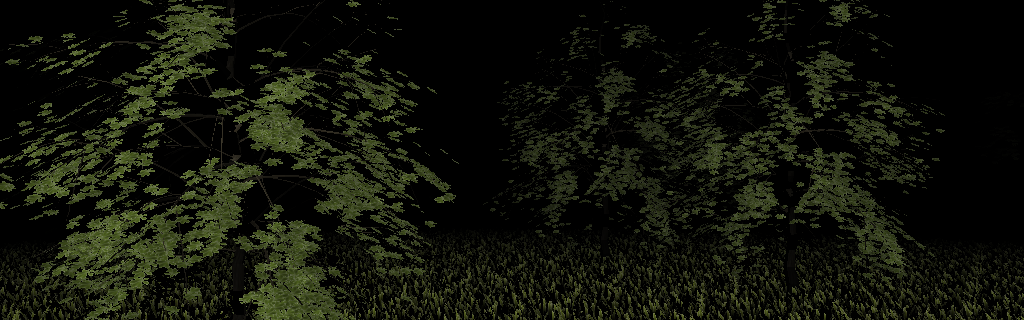
Instance culling using geometry shaders
Since the appearance of Shader Model 4.0 people wonder how to take advantage of the newly introduced programmable pipeline stage. The most important feature enabled by geometry shaders is that one can change the amount of emitted primitives inside the pipeline. The first thing that a naive developer would try to do with it is geometry tesselation. However, the new shader performs very bad when used for tesselation in a real life scenario even though there are demos show casting this possibility. If we take a closer look at the new feature we observe that the most revolutionary in it is not that it can raise the number of emitted primitives but that it can discard them. This article would like to present a rendering technique that takes advantage of this aspect of geometry shaders to enable the GPU accelerated culling of higher order primitives.
Geometry shaders can be used for many different advanced rendering techniques that were impossible before the introduction of this flexible programmable shader stage. In this article I would like to present one use case that for me seemed to be one of the most practical application of primitive manipulation possibilities introduced by geometry shaders. As I haven’t seen any whitepaper talking specifically about this particular technique, even if some of them inherently used it, I would dare name the technique myself as Instance Cloud Reduction. I will also present a demo program that shows how to take advantage of the technique in a heavy workload situation.
The idea itself was inspired by AMD’s tech demo for the Radeon 4800 series cards called March of the Froblins. An almost identical technique presented in this article is used in the mentioned demo for the culling of large amount of animated creatures against the view frustum. Also a somewhat similar technique is used in NVIDIA’s Skinned Instancing demo for determining LOD instance sets. Unfortunately, both demos are for DirectX only and, as far as I can tell, there is no OpenGL demo showing any of the aforementioned rendering techniques.
Motivation
Nowadays, as the computational capabilities of GPUs is growing in a much faster pace than that of CPUs, graphics developers meet more and more optimization problems related to CPU bound applications. More and more focus is on minimizing the number of driver invocations, actually that’s what motivated the restructuring of the two most commonly used graphics APIs. As a result we have now DirectX 10+ and OpenGL 3+. However, even if the introduction of geometry instancing, texture arrays and local memory buffer storage for the most important inputs of the rendering, there is still need for wise decisions from graphics programmers to take full advantage of the horsepower coming with the latest GPUs.
Earlier graphics applications strongly relied on CPU based culling techniques, whether it be the usage of the quite outdated BSPs or the more generic and still heavily applied hierarchical culling techniques. We’ve already reached the point that sometimes even the most efficient CPU based culling techniques seem to be too expensive and usually introduce the small batch problem. Instanced rendering is not an exception.
The applicability of geometry instancing is strongly limited by several factors. One of the most important ones is the culling of instanced geometries. One may choose to cull these objects in the same fashion as others, using the CPU, but that usually breaks the batch and maybe we loose the benefits of geometry instancing. It is more and more imminent to have a GPU based alternative. Without CPU based culling, by sending the whole bunch of instances down the graphics pipeline may choke our vertex processor in case we have high poly geometries and quite large amount of instances of it.
The rendering technique presented in this article will try to achieve this goal. We will use a multi-pass technique that in the first pass culls the object instances against the view frustum using the GPU and in the second pass renders only those instances that are likely to be visible in the final scene. This way we can severely reduce the amount of vertex data sent through the graphics pipeline.
Implementation
For some people it might seem that the promise for such a technique is simply too naive and is most probably relying on very exotic OpenGL features, heavy misuse of some basic features or need of data conversions during the frame rendering. Wondrously, this is not the case as we have all we need in OpenGL 3.2 to implement the object culling method sketched above. All we need are the followings:
- instanced rendering (core since OpenGL 3.1)
- geometry shaders (core since OpenGL 3.2)
- transform feedback (core since OpenGL 3.0)
- uniform or texture buffers (core since OpenGL 3.1)
The method itself is a multi-pass rendering technique, however, unlike other multi-pass rendering techniques it does not produce any fragments in the first pass, instead the first pass does the view frustum culling and processes data entirely only inside buffer objects.
Culling pass
In the first pass we will feed the graphics pipeline with information about the instances that are needed to perform the view frustum culling. For this we need two inputs for the executed shaders in order to be able to perform the required calculations:
- Instance transformation data (whether it be a simple transformation matrix or quaternions or whatever) -- This preferably comes from one or more buffer objects that are bound as vertex buffers to the context.
- Object extents information -- Beside the instance positions we have to know the extents of an instance in order to perform correct culling. This can be either a single float representing the object radius if we choose to use bounding spheres for the culling or a three-dimensional extent vector if we would like to use bounding boxes.
Using these as input we can feed in the instance transformation data as attributes of point primitives to our culling shader. The culling shader is composed of a vertex and a geometry shader. In a typical setup the role of each is the following: the vertex shader determines whether the actual object instance’s bounding volume is inside the view frustum and sends a flag about the culling to the geometry shader, that will emit the instance data to the destination buffer if the flag says that the instance is likely to be visible or does not emit anything if it is determined that the object instance is out of view.
Next, transform feedback is used to capture the primitives emitted by the geometry shader into another buffer object that will be used in the actual rendering pass to source instance transformation data. Beside this, we also need to have an asynchronous query to determine the number of primitives generated to know how many instances of the object do we actually need to render. The following figure shows the workflow of the first pass:
The actual geometry shader implementation needed to perform the actual culling based on the view frustum check performed by the vertex shader should look like the following chunk:
#version 150 core
layout(points) in;
layout(points, max_vertices = 1) out;
in vec4 OrigPosition[1];
flat in int objectVisible[1];
out vec4 CulledPosition;
void main() {
/* only emit primitive if the object is visible */
if ( objectVisible[0] == 1 )
{
CulledPosition = OrigPosition[0];
EmitVertex();
EndPrimitive();
}
}
In this example we used only simply a four-component position vector for the instance transformation data but the technique works well for transformation matrices and quaternions as well.
One more thing is that beside that we set up transform feedback in a way that we feed our buffer object dedicated for the culled instance data and we also started an asynchronous query to be able to determine the number of primitives written into the buffer object, it is also useful to turn of rasterization as we wouldn’t like to produce any fragments as a result of the first pass.
Rendering pass
In the second pass there is nothing special to do. Simply use whatever rendering setup you would like to use. The only things that need to be changed in this step compared to your already existing rendering path is that the instance data for the rendering must be sourced from the generated culled instance data buffer and, as a result, the number of instances passed for the instanced drawing functions shall be changed in order to render only the visible instances. This number can be read from the asynchronous query’s result that we started in the first pass.
The instance data in the rendering pass can be, of course, sourced from either a uniform or a texture buffer object. This depends on the actual use case and is more clearly explained in the article Uniform Buffers VS Texture Buffers.
Important note is that when one has to deal with several instanced geometries it is recommended to do the culling phase prior to rendering any instanced primitives because of the following reasons:
- The result of the first instance cloud’s culling is more likely to be finished on the GPU so no sync issues arise from reading the asynchronous query result to determine the number of visible instances.
- Probably less state changes are needed as very different setup is required by the two passes.
- Results in tidier renderer design as culling is clearly separated from actual rendering.
Putting everything together, the application of the presented technique would result in the following workflow on the GPU:
Conclusion
We’ve seen that the presented advanced rendering technique is able to help in situations when we have to deal with large number of instanced geometries and how to take advantage of the latest features of graphics cards and OpenGL to perform view frustum culling calculations on the GPU. This prevents us from having to deal with complicated and expensive CPU based object culling methods that break the drawing batches, especially when dealing with dynamic objects. For ease the decision whether to incorporate this technique in your rendering engine I would like to present the advantages and disadvantages of it.
Advantages:
- Heavily reduces the amount of processed data in a naive implementation.
- No need for any space partitioning methods in the host application to handle the culling of dynamic objects.
- Can handle huge amount of instanced objects due to the enormous horsepower of today’s GPUs.
- Scales well with increased number of instances as the per-instance calculation is relatively low.
- Relies strictly on OpenGL 3.2 core features.
- No need for OpenCL capable hardware.
Disadvantages:
- Needs an extra rendering pass to perform the culling.
- Requires the usage of asynchronous queries to determine the number of visible instances.
I hope you agree with me and think about this technique as one more step towards fully GPU based scene management. If you have any remarks or improvement ideas regarding to the rendering technique itself feel free to tell me.
The Demo
As I promised, the technique presented above comes with a live demo that actually took most of my time dedicated to writing this blog in the last two weeks. The demo itself is more like a technical show cast rather than a presentation of a real-life use case scenario.
First of all, I used high polygon count models for the rendering to emphasize the amount of time the culling phase spares from the very valuable time of our GPU. In a real world application one would never do something like this. As a result, the demo is more like a benchmark than an interactive application. However, maybe on high-end graphics cards it can perform pretty well.
The demo scene consists of two object types: trees and grass blocks. The tree model is further divided into two parts as they need different textures: the tree trunk and the tree foliage. Obviously, this additional burden can be prevented by using texture arrays to avoid the need of separate draw calls to render the trunk and the foliage.
The tree trunk consists of 33138 triangles, the tree foliage has 16069 triangles and the faking-free grass block consists of 8961 triangles which I had to model myself as didn’t found any suitable model. Actually this modeling step consumed quite a reasonable amount of my time spent with the demo as I’m not an expert in this domain.As you can see, these models are not the ones that one might use in an interactive real-time application like games. However, they seemed to be very suitable for the purpose of the demonstration.
What really kicks off the boundaries of GPUs is that the demo renders 10,000 trees and 250,000 grass blocks using instancing. This ends up in more than 2.7 billion triangles in the scene. This is far more that a GPU can handle without the aid of some scene management and culling. However, we will use no scene management at all and the only culling method that we will use is the one presented in this article.
The actual results are quite promising. The view frustum culling step usually spares more than 99.9% of the GPU horsepower as the amount of actually rendered triangles after the culling step is far below 2 million triangles. This is still quite much but as we use high polygon count models and we don’t use any LOD techniques this seems reasonable.
Even if the demo scene statistics doesn’t seem like a typical use case scenario, the ease of the implementation and the compelling visual results made me pleased anyway:
On my Radeon HD2600XT I have achieved 6-7 frames per second which is acceptable taking in consideration the huge amount of geometry data still passed to the graphics card. On more recent cards I suppose it should run with good frame rates, however, due to the lack of hardware to test on, these are my only results. If anybody manages to take a better screen capture than mine above then please let me know.
Implementation details
Just to tell a few words about what techniques and tricks I’ve used during the creation of the demo here is a listing of the most important ones:
- Three models are used as mentioned previously with high instance counts with over 2.7 billion of total triangles in the scene as mentioned already.
- Three 512x512 RGBA textures are used for the models that are partially handmade, and again, I’m not a texture artist so sorry if they don’t look flawless.
- The wavefront model and TGA image loader that accompany the demo are very roughly implemented only for the demo so I would strongly encourage you not to use it to any purpose as it handles only a subset of the possibilities of the file formats.
- The vertex data from the wavefront model files is transferred in a very naive way so vertex reuse isn’t taken into account.
- The instance data consists of simple four-component vectors representing the world-space position of the instance. This seemed to be the most simple for the demonstration purposes.
- In the second pass, the instance data is sourced from a texture buffer but not really because the visible instance count exceeded the amount that would fit in a uniform buffer. I used texture buffers because for this simple demonstration they seemed to be a little bit more easy to be integrated.
- The morphing effect that simulated wind blow is done using hard-coded geometry deformation in the vertex shader. It is not physically correct but visually compelling.
- The lighting is a simple directional light using Phong’s shading and reflection model.
- Simple fog is simulated with some awkward formula that I’ve chosen after a few test runs.
- Alpha testing is achieved by using the discard operation in the fragment shader.
Driver issues
During the development of the demonstration program I’ve met several driver related problems as I’ve never used so heavily the latest OpenGL features previously. I’ve worked with Catalyst 9.12 and 10.1 but both seemed to lack of a proper GLSL compiler. Here are some of the issues I’ve met:
- When I’ve forgot to declare the varyings in the geometry shader as arrays like the standard requires then still the driver hasn’t complained about any syntax error but when tried to execute the code the program crashed.
- Except the texture sampler uniform, all other uniforms failed to work when used in the fragment shader only so I’ve put them all in the vertex shader.
- For loops seemed not to work when used inside the geometry shader, that’s why the culling itself is done in the vertex shader in the demo.
All these problems resulted in nasty tricks to make things working and ended up in awful shader code. Sorry for that. At least now it works on my configuration but pretty unsure whether it will work on other graphics card and driver combos. Please report me any success or failure when trying out the demo. Anyway, be sure to have the latest graphics drivers installed as, at least in case of AMD, OpenGL 3.2 drivers came out only at the fall of 2009.
Edit:
Thanks to the information got from Pierre Boudier from AMD I’ve updated both the source and binary releases to support the latest drivers properly. The problem was that I didn’t use attribute location binding as specified in the standard.
Also have to mention that with my new Radeon HD5770 I managed to achieve over 90 frames per second that actually show that this technique can be in fact used for games and other interactive applications.
One more thing in the end. As you know this version of the Nature demo uses a texture buffer to source instance positions. I plan to create another version that will take advantage of the instanced arrays introduced in core with OpenGL 3.4. I expect quite a reasonable speedup as that would eliminate the need for texture fetches in the vertex array by rather dedicating a vertex fetcher for the purpose thus increasing the overall performance of the technique.
Binary release
Platform: Windows
Dependency: OpenGL 3.2 capable graphics driver
Download link: nature12_win32.zip (3.58MB)
Comments: Includes the update that makes it work even with the latest drivers.
Full source code
Language: C++
Platform: cross-platform
Dependency: GLEW, SFML, GLM
Download link: nature12_src.zip (12.6KB)
Comments: Sorry for the many dependencies, however, I would recommend the mentioned libraries for everybody who is doing OpenGL development.
| Print article | This entry was posted by Daniel Rákos on February 8, 2010 at 10:58 pm, and is filed under Graphics, Programming, Samples. Follow any responses to this post through RSS 2.0. You can leave a response or trackback from your own site. |


about 3 years ago
It failed on a GeForce 8800GTX with the latestes drivers from January:
> Initializing scene data…
> Loading meshes…
> tree_foliage.obj: 16069 triangles
> tree_trunk.obj: 33138 triangles
> grass.obj: 8961 triangles
> Uploading mesh data to GPU…
> Loading textures…
> Uploading texture data to GPU…
> Loading shaders…
Failed to compile shader: cull.vs
0(13) : error C7514: OpenGL does not allow varying of type bool
about 3 years ago
Hmm. Very strange. I haven’t found any indication related to this in the GLSL specification.
Can you try to change the declaration of the bool output in the VS and the input in the GS to have the storage qualifier “flat”? Maybe the NVIDIA driver complains because it cannot interpolate the bool value. Btw, it wouldn’t be needed anyway as the output of the VS goes directly to the GS without any interpolation.
If this does not work then maybe I’ll have to change the varying into an integer for the favor of the NVIDIA drivers.
Anyway, I don’t see anything in the specification what is against this. If I’m wrong, please tell me.
about 3 years ago
Can you try these two shader patches out:
1. Using flat bool varying: nature_nvidia_patch1.zip
2. Using flat int varying: nature_nvidia_patch2.zip
If the first patch is working fine then that’s okay.
If only the second works, well, then it means that NVIDIA really does not support bool varyings for some strange reason.
If none of these are working then NVIDIA should take a look at it…
about 3 years ago
Thanks a lot for interesting articles.
This demo runs here GeForce 9500GT typically at 25-26FPS, when having camera in position like in typical first person game.
I had to use the patch2 with ForceWare 196.21 to make it work.
about 3 years ago
Hi
Demo closed with error
Error: OpenGL 3.2 is required
But
GPU Caps Viewer Report
OpenGL Version: 3.2.0
- GLSL (OpenGL Shading Language) Version: 1.50 NVIDIA via Cg compiler
- OpenGL Renderer: GeForce 8600 GT/PCI/SSE2/3DNOW!
Drivers Version: Forceware 6.14.11.9089 (8-27-2009)
about 3 years ago
Thanks for the feedback! I’ll include then the second patch into the core downloadable ZIP files.
I use GLEW to check whether the graphics driver is OpenGL 3.2 capable. Beside it checks the version string it also tries to load all the function pointers required by the 3.2 version of OpenGL.
I suppose the Forceware version you have does not correctly expose all the function pointers and that’s why it is not working. I suggest you to try to update your drivers as early OpenGL 3.2 driver support sometimes makes life really hard. As you have seen, I had many problems with the Catalyst drivers as well.
If the problem is still there then please notify me about it.
about 3 years ago
Bools are no valid vertex and geometry shader output, section 4.3.6, page 33:
Vertex and geometry output variables output per-vertex data and are declared using the out storage qualifier, the centroid out storage qualifier, or the deprecated varying storage qualifier. They can only be float, floating-point vectors, matrices, signed or unsigned integers or integer vectors, or arrays or structures of any these.
Similarly, bools are no valid fragment shader inputs, as defined in the spec, section 4.3.4, page 32:
… They are declared in fragment shaders with the in storage qualifier, the centroid in storage qualifier, or the deprecated varying and centroid varying storage qualifiers. Fragment inputs can only be signed and
unsigned integers and integer vectors, float, floating-point vectors, matrices, or arrays or structures of these. Fragment shader inputs that are signed or unsigned integers or integer vectors must be qualified
with the interpolation qualifier flat.
It then worked with the flat int specifiers:
FPS: 11.4687
Trees visible: 5/10000
Grass visible: 111/250000
Visible geometry: 1.24071/2732.32 MTris
about 3 years ago
Thanks for the help. I didn’t know about that restriction and actually it seems a bit weird for me as the driver would be able to treat bools as special forms of integers.
Anyway, that means I was wrong. Thanks for the clarification!
This is a special moment as we’ve found an example when the ATI drivers are more relaxed compared to the standard, not the NVIDIA ones
about 3 years ago
Very Cool demo. Thanks for publishing this.
For linux users …. I tested this
On Linux Ubuntu 9.10
GeForce 9600 GT/PCI/SSE2/3DNOW! from NVIDIA Corporation
OpenGL version 3.2.0 NVIDIA 195.17 is supported
FYI 36FPS observed. Note had to use cull.vs and cull.gs without bool.
I was able to get this to compile and run but the order in which the libraries were linked mattered — following fixed my ” Error: OpenGL 3.2 is required” mentioned by another in a previous post ie
g++ *.o -lGLEW -lsfml-graphics -lsfml-window -lsfml-system
worked (but failed to run if -lGLEW at end)
about 3 years ago
35-40 FPS on GTX285, 8 cores
Thank you for sharing.
about 3 years ago
Yes, the order of the library matters as GCC uses a smart linkage method that requires the order to be in the correct way.
I’ll add the linkage order to the article to ease non-Windows users the compilation.
Also, in the future I plan to release also linux binaries.
about 3 years ago
>0(13) : error C7514: OpenGL does not allow varying > of type bool
Replace the bool in the shaders by an int (should work with smaller types) for example. The following modifications work on Nvidia Quadro with drive 195.62.
I did in cull.vs:
replace out bool objectVisible;
by out int objectVisible;
replace objectVisible = inFrustum;
by objectVisible = inFrustum?1:0;
i did in cull.gs
replace in bool objectVisible[1];
by in int objectVisible[1];
replace if ( objectVisible[0])
by if ( objectVisible[0] == 1 )
Obi
about 3 years ago
i7 @4GHz(no turbo, no HT), GTX 285 @702MHz
got about 54fps generally moving around, got it to drop to 39 looking at a combo of trees up close, if i look straight down i get like over 400 fps.
about 3 years ago
>>it checks the version string it also tries to load >>all the function pointers required by the 3.2 >>version of OpenGL
Yes. You are right.
Old driver did not contain a pointers to
glGetInteger64i_v,glProgramParameteri,glFramebufferTextureFace,
but contain
glProgramParameteriARB,glFramebufferTextureFaceARB.
I downloaded a new version of the driver
(nVIDIA Display Driver v196.21), but also not contains pointers to
glProgramParameteri,
only glProgramParameteriARB.
GLEW could check function with the suffix ARB, because they are identical.But it is their problem.
Thank you for a good demo. Waiting for new articles.
about 3 years ago
Btw, GLEW is right as the driver should expose both versions of the function pointers if it wants to conform to the standard. However, from practical point of view, the two functions are identical so it should work with the ARB extensions as well. I just wanted to stick to core standard features only. Anyway, I still violated it once as I used anisotropic filtering for the leaves.
about 3 years ago
> Initializing scene data…
> Loading meshes…
> tree_foliage.obj: 16069 triangles
> tree_trunk.obj: 33138 triangles
> grass.obj: 8961 triangles
> Uploading mesh data to GPU…
> Loading textures…
> Uploading texture data to GPU…
> Loading shaders…
Failed to link shaders:
Geometry info
————-
(0) : fatal error C9999: *** exception during compilation ***
Link info
———
error: Varying (named CulledPosition) specified but not present in the program object.
> Creating instances…
> Configuring rendering environment…
> Done!
Warning: OpenGL error code: 1281
GF8800GTX, drivers 190.58 (from nVidia’s opengl_3_driver page)
about 3 years ago
I will check what could cause the problem, but it seems that it’s a problem with the NVIDIA drivers as that “exception during compilation” error message is very suspicious for me. Also, CulledPosition is the output varying that is bound to the transform feedback buffer so there should be no such linkage error related to it.
about 3 years ago
Well, if you take a look at NV specific extension for transform feedback, you will see that it requires that varying variables which will be recorded first be marked as active, in order not to be optimized away.
BTW, the only way I found to get transform feedback working on my university computer is using NV extension – using EXT or 3.0 way does not work. I tried few different drivers, it did not help.
about 3 years ago
It may be possible, however I don’t have NVIDIA cards to test on. I use OpenGL 3.0 in the demo.
Still, it is very strange that others managed to make it run on NVIDIA cards, using the OpenGL 3.0 based transform feedback, so maybe the problem is something else and I’m pretty sure that it’s related to the NVIDIA drivers…
about 3 years ago
I just tested this at home (R4850) – and something is wrong. The closest grass blades get culled (most of the time) – depending on distance and view angle. screenshot: http://i274.photobucket.com/albums/jj262/dzenanz/ReallyCulled.png
about 3 years ago
This is definitely a problem. My algorithm is basically to execute view frustum culling on object level rather than vertex level, however it seems that in your case it was done incorrectly. This is weird…
Can you tell me what Catalyst version you have? I also have an ATI card so maybe it would be easier to reproduce the problem and to correct it if the problem is in the code.
about 3 years ago
I had on old version (8.12), which had support for only OpenGL 3.1, so I updated to latest 10.2 to run your demo.
about 3 years ago
Hmm that’s amazing but actually i have a hard time understanding it… wonder what others have to say..
about 3 years ago
Same culling problems as Dženan here.
ATI Radeon 5870 with recent drivers:
Driver Packaging Version 8.702-100202a-095689C-ATI
Catalyst™ Version 10.2
Provider ATI Technologies Inc.
2D Driver Version 6.14.10.7050
2D Driver File Path System/CurrentControlSet/Control/Video/{F6B1B0BE-5F52-400F-8D62-5342FCB2BAB6}/0000
Direct3D Version 6.14.10.0728
OpenGL Version 6.14.10.9551
Catalyst™ Control Center Version 2010.0202.2335.42270
Thanks,
Erwin
about 2 years ago
hi,
we have looked at your demo and found out that you were calling glBindAttribLocations after glLinkPorgram; according to the GL specification, this should have no effect on the rendering.
unfortunately, some prior AMD driver were not implementing this correctly, but it has been fixed recently with cat 10.5, so you should update your demo.
looking at other IHV, it seems that apple correctly implement this part of the GL specification as well.
regards,
Pierre B.
AMD
about 2 years ago
Thanks for sharing this information!
I was wondering why the demo didn’t work after I upgraded my drivers.
I will update the demo.
about 2 years ago
Hello. I try use this code but error in I run – console startup loading shader and crash application. Demo works fine. Windows 7 , geforce GTS 250 , new nvidia driver, glm 0.9.0.1, glew 1.5.4, sfml 2.0 – compile fine in debug or release but run error in loader shader. Of course exe and shader exist – this line error glShaderSource(shader, 1, (const GLchar**)&source, NULL);
about 2 years ago
Hmm, can anybody confirm this problem? I didn’t met it on ATI drivers. If you really use the latest available NVIDIA driver then maybe it is a driver bug. However, I cannot confirm that either.
about 2 years ago
I use old driver and problem exist. Question – you using glew 1.5.4 or other version?
about 2 years ago
Then maybe you should use the latest NVIDIA drivers as most probably only those have good support for OpenGL 3.2+.
Btw I use the latest version of glew that is (I think) 1.5.4.
about 2 years ago
Maybe I’ll send you an projet. Maybe I set something wrong in the project or my system is wrong? I use visual studio 2008 EE sp1
about 2 years ago
So the EXE delivered is working for you, just you cannot recompile the project properly.
Well, maybe the problem is with SFML as you have to use the latest development branch in order to take advantage of OpenGL 3 context support. Maybe I’m wrong, but that can be an issue.
Btw I compiled everything with GCC.
about 2 years ago
Maybe I try tommorow change shader loader function.
about 2 years ago
~400 FPS on a GTX 470
about 2 years ago
I had the same problem. This version of loadShaderFromFile works for me:
http://codepad.org/tAt1EoYR
about 2 years ago
Thanks Erwin (for this code and Bullet). This is my new code:
GLuint shader = glCreateShader(shaderType);
ifstream fileIn(filename);
if(!fileIn.good()){ std::cerr << "Load shader – ERROR: " << filename << std::endl;}
string stringBuffer(std::istreambuf_iterator(fileIn), std::istreambuf_iterator()));
string source1 = stringBuffer;
const GLchar *tmp = static_cast(source1.c_str());
glShaderSource(shader, 1, (const GLchar**)&tmp, NULL);
glCompileShader(shader);
Thanks Daniel for this tutorials. Demo works:
~120FPS from Geforce GTS250, Intel I3 530, Windows 7
about 2 years ago
Hello, I’m also from Hungary, I achieved 50-60 FPS on a 8600GT, which is similar to 2600XT I cant understand that 6 FPS
about 2 years ago
Since that I’ve been optimizing the algorithm a bit, so most probably also on the 2600XT it would work faster, however I already replaced my video card with a 5770. Anyway it is possible that the algorithm performs better on NVIDIA cards.
about 2 years ago
Hey dude, I sent you a message some time ago on youtube, asking for the models you used in this demo, which was quite silly of me because they were actually included along with the binary. Anyways, I have a slight issue: I generate terrain blocks with the GPU using a density volume, and as suchm i have quite a few blocks(4*4 minimum, excluding coarser(larger) blocks for lod), and for each of these is do another geometry shader pass to generate points for instances(currently just a sphere with 75 vertices or so) and I found that doing the query to retrieve the culled instances for each block was quite expansive(performed once for each block I know there to be instances), so I wound up puting all those instances into a huge buffer and doing just one query. Is querying a transform feedback really that expansive?
Btw I ran your demo with my GT9500, and while I can not remember the fps, it ran quite fluently)
about 2 years ago
Sorry, don’t really read the youtube comments.
Actually querying transform feedback is a cheap operation, the only problem is that the query blocks by default until the results are available. So for you it seemed expensive only because you waited for the latecy between the geometry culling pass and the query results retrieval. In practice you should fill that time with other rendering tasks so you don’t have to stall the CPU (and inherently the GPU) by using blocking query readback.
In your case when you have several blocks to cull I would do it in the following way:
for i = 1 to block.count docull_with_geometry_shader(block[i])
endfor
for i = 1 to block.count do
inst_count = get_query_result(i)
draw_instanced(block[i], inst_count)
endfor
I hope this helps.
about 2 years ago
Ahh I see, I have always used only one query object. I should have an array of them, one for each block? And maybe I should also do some trivial task between drawing and culling, like drawing the skybox?
And yeah it helps, makes sense now, it was geting me really frustrated, I am so used to thinking that everything needs to be sequential.
about 2 years ago
Yes, you should do it that way.
Actually that can differentiate an efficient and an inefficient OpenGL app that how much you care about the parallel nature of the client-server architecture.
about 1 year ago
GTX 465 – 240 fps on average, rarely falling down to minimum of 150 fps for a second. Nice demo
about 1 year ago
If not for Instanced data, or, the instance count is not that large, would the method here also be a gain? Compared to culling on CPU, the mass of vertices’ data must be sent almost twice. And it’s after the geometry stage that vertices are automatically culled for the view port. thank you.
about 1 year ago
In case you don’t use instancing or the instance count is too small, then it is possible that the delay caused by waiting for the culling pass’s result would be prohibitive.
However, you should know that no actual vertex data is passed to the culling pass so that’s not true that vertex data has to be sent twice as you use only the instance data buffer in the culling pass.
In most cases, actually not the culling pass that takes time but the waiting for the culling results is the one that is rather expensive.
Actually there is a solution for both problems (i.e. for non-instanced data and query result delay) if you use OpenGL 4.2+ and I plan to write a demo that will show this technique, however, the technique presented in this article provides advantages only in case of instanced data and in case the instance count is relatively high.
about 1 year ago
thank for reply. Looking forwards to the article!(though my cards are limited to 3.3~)
By the way, for instancing, if I use crossed billboards for the grass instead of model, then I may still do instancing with attributes divisor or so and draw using one call; or I may just draw points of position(glDrawArrays(GL_POINTS,..), one draw call though), and populate them in the geometry shader. Which one may be better?
Another, for instancing, if i do culling as above,then i may first pass the instance data(position) to the pipeline, then the actual vertices by the 2nd pass. As the count ratio of them is merely 4:1,or at most 12:1, i tended to think the culling pass cost not so little compared to the whole “vertices” sent . or maybe still a gain to cpu culling? is that right or not? thanks
about 6 months ago
HI there
Thanks very much for the article.
I really like this technique. I would like to use it to render many instanced objects ( eg a forest ). And also to use it to select LOD levels for the instanced objects too.
( ie, only select an object if it is in the frustum, and if satisfies the current LOD level )
So you would execute this system once for each LOD level.
I would very much like to avoid the async-query issue though. I have access to OpenGL4.2+. Could you let me know how you believe we can avoid this issue in 4.2+?
Thanks a lot!
Ren
about 6 months ago
Oh. Hey. I was just reading your other article here http://rastergrid.com/blog/2010/06/instance-cloud-reduction-reloaded/
And saw your comments relating to ARB_draw_indirect and atomic_counters.
This indeed seems to solve the problem of the async-query. Which is great.
Have you had a chance to test this out? Do you think it will indeed work as expected?
I can’t wait to have a go at implementing this.
I also like the new addition of ARB_conservative_depth. Back on PS3 I really wanted this ability. It should be great for writing tons of billboard/impostor images which also have depth stored in the texture. ( eg for forest )
Thanks!
Ren
about 6 months ago
This here seems to suggest that NVidia now have support for ARB_conservative_depth
http://www.opengl.org/discussion_boards/showthread.php/175346-NVIDIA-releases-OpenGL-4-2-drivers
about 6 months ago
In fact, there is another option besides ARB_draw_indirect and ARB_atomic_counters, namely AMD_query_buffer_object (http://www.opengl.org/registry/specs/AMD/query_buffer_object.txt), however, that’s currently supported only on AMD hardware.
Also, you probably want to take a look at my article: http://rastergrid.com/blog/2010/10/gpu-based-dynamic-geometry-lod/
This shows how you can take advantage of ARB_transform_feedback3 to perform LOD determination together with the culling.